Sharing should have a clear boundary
Shared sticky notes sound simple until the notes live beside private work. A household list may sit near medical reminders. A client handoff may share a board with draft prices, personal errands, or notes for another client. The usual solutions are awkward: share the whole workspace, copy selected notes into a second tool, or send screenshots that become outdated as soon as something changes.
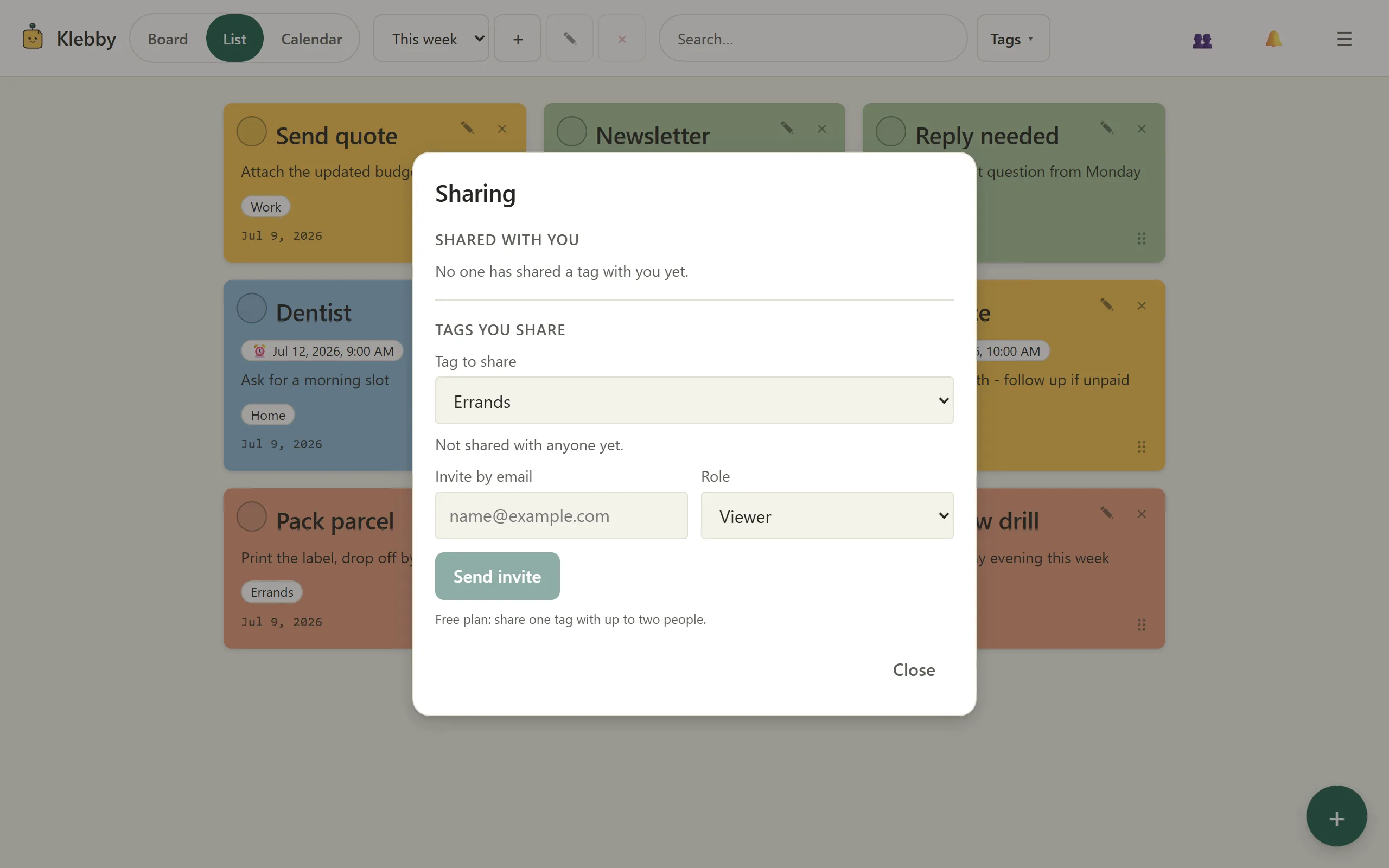
A better boundary starts with the question, “What context does this person actually need?” In Klebby, that boundary is a tag. Add the shared tag to the relevant notes, invite the people involved, and leave everything else outside it. The shared set can change over time without opening the remainder of your account.
This is a deliberately small model. It does not try to turn every personal note into team infrastructure. It lets a private board contain a few shared contexts while remaining private by default.
Share a tag, not an entire board
A tag can describe a real slice of work: “house move”, “launch copy”, “Friday market”, or “course project”. When that tag is shared, invited people can access the notes carrying it. A note without the tag is not included merely because it happens to sit nearby on your board.
That distinction matters because spatial proximity is personal. You might place a shared shopping note beside a private budget reminder because the relationship helps you think. The collaborator needs the shopping note, not the budget reminder or the logic of your whole layout.
Tag-level sharing also avoids maintaining duplicate workspaces. You can keep one note, update it in one place, and use the tag both for filtering and access. When the context ends, remove access or stop using the tag rather than hunting down copies across messages and documents.
See the sharing and board features for the current product scope, or open Klebby to try the model with a small set.
Viewer and editor roles keep expectations clear
Not everyone who needs visibility should be able to change the source. A viewer can read the shared notes. That role suits a client following progress, a family member checking a plan, or a teammate who needs reference material. An editor can update the notes, which suits someone sharing responsibility for the work.
Choose the least powerful role that still lets the person do their part. This is not about distrusting collaborators. It is about making the agreement visible. A person invited to review does not need to wonder whether they should rewrite a note. A person invited to help can act without sending a separate request for every change.
Roles also make mistakes less likely. If a set is mainly informational, viewer access removes accidental edits from the normal path. If the work is genuinely joint, editor access keeps changes in the shared context instead of pushing them into parallel chat messages.
Your remaining notes stay private
“Private by default” is only useful if it survives ordinary use. Sharing one tag should not quietly expose untagged notes, unrelated tags, or the rest of a board. In Klebby, the share is tied to the selected tag. Notes outside it remain outside the collaborator’s view.
Still, the owner has a responsibility to tag carefully. Before inviting someone, filter by the tag and review what is included. A note can carry more than one tag, so check whether a note contains private details even if its other context is shareable. Clear titles help, but the body matters too.
Treat that filtered view as a quick access review. Remove the tag from anything that does not belong, then invite. Repeat the check when the purpose changes. This small habit is more reliable than assuming a workspace boundary will compensate for unclear content.
Personal layouts can remain personal
People rarely organize the same information in the same way. One person may keep active notes in the centre and waiting notes on the right. Another may rely on a compact list. A shared system becomes frustrating when one collaborator’s rearrangement destroys everyone else’s spatial memory.
Klebby keeps board positions per user. The shared note is common, but its position on your board is yours. A collaborator can arrange the same shared set in a way that helps them without reorganizing your view. That makes shared sticky notes less like a single physical wall where everyone fights for space and more like shared content with personal working surfaces.
The list view offers another option when layout is irrelevant. You can scan the shared tag compactly, then return to your board. The content remains the same; only the view changes.
Keep discussion attached to the note
Shared work often leaks into chat. Someone posts a screenshot, another person answers hours later, and the reason behind a change becomes difficult to recover. Comments on a shared note keep the conversation beside the item it concerns.
Use comments for short questions, decisions, and clarifications. Update the note itself when the shared truth changes. For example, a comment might ask whether Saturday still works; once confirmed, the note should carry the agreed date. That prevents the latest fact from being buried in a thread.
This pattern has limits. Long discussions, formal approvals, and large documents may belong in dedicated tools. Klebby is better for lightweight coordination where a note is the natural unit: a task, an idea, an item to bring, or a small decision.
Use a small sharing routine
Start with one purpose and one tag. Name it so invited people understand the boundary. Add only the notes that genuinely belong. Filter the board by that tag and read every included note before sending an invitation.
Next, choose roles individually. Give viewer access when someone only needs awareness. Give editor access when they share responsibility. Put a short explanation in the first note so the group knows what belongs in the set and what should stay elsewhere.
During use, keep each note focused. Mark resolved items done or remove them from the active set. Use comments for local context, not as a replacement for updating the note. When the collaboration ends, review the members and remove access that is no longer needed.
The routine is intentionally boring. A clear boundary, a clear role, and a short review do more for safe collaboration than a complicated permission structure nobody remembers.
Know when a separate workspace is better
Tag-level sharing is useful when a private note system contains a few collaborative slices. It is not the right answer for every organization. A large team with departments, formal records, complex approvals, file libraries, or reporting requirements probably needs a dedicated team platform.
A separate workspace may also be clearer when nearly everything is shared. If the private remainder is tiny and the group needs common structure, forcing all work through one tag could become artificial. Pick the boundary that matches the real work, not the one that sounds most distinctive.
For households, freelancers, students, creators, and small groups, the lighter model can be enough: share the context, not the account. The guide to organizing digital sticky notes helps keep the private and shared remainder readable, while the visual to-do list guide explains when a board adds value. Current Free and Pro limits are listed plainly on the pricing page.
Shared where needed, private everywhere else
Good sharing is not measured by how much a tool exposes. It is measured by whether the right people can see and change the right material without gaining access to unrelated work.
Shared tags, viewer and editor roles, personal board positions, and note-level comments create a modest boundary around practical collaboration. They do not replace judgment, and they do not turn Klebby into an enterprise workspace. They make one common situation easier: a person has a private board, some notes involve other people, and copying those notes elsewhere would create more mess.
Begin with one real context. Review the tag before inviting, choose roles carefully, and keep the shared notes narrow. If the boundary remains easy to explain in one sentence, it is probably doing its job.
FAQ
Can I share only some sticky notes?
Yes. In Klebby, you share a tag. People invited to that tag can access notes carrying it, while notes outside the tag remain private.
What is the difference between a viewer and an editor?
A viewer can read the shared notes. An editor can also update them. Choose the smallest role that matches what the person needs to do.
Does sharing a tag expose my board layout?
No. Board positions are personal. Collaborators work with the shared notes without taking over the private arrangement you use to organize them.
Can collaborators use Klebby for free?
Yes. Collaborators can participate without buying Pro. Sharing limits depend on the plan of the person who owns the shared tag.