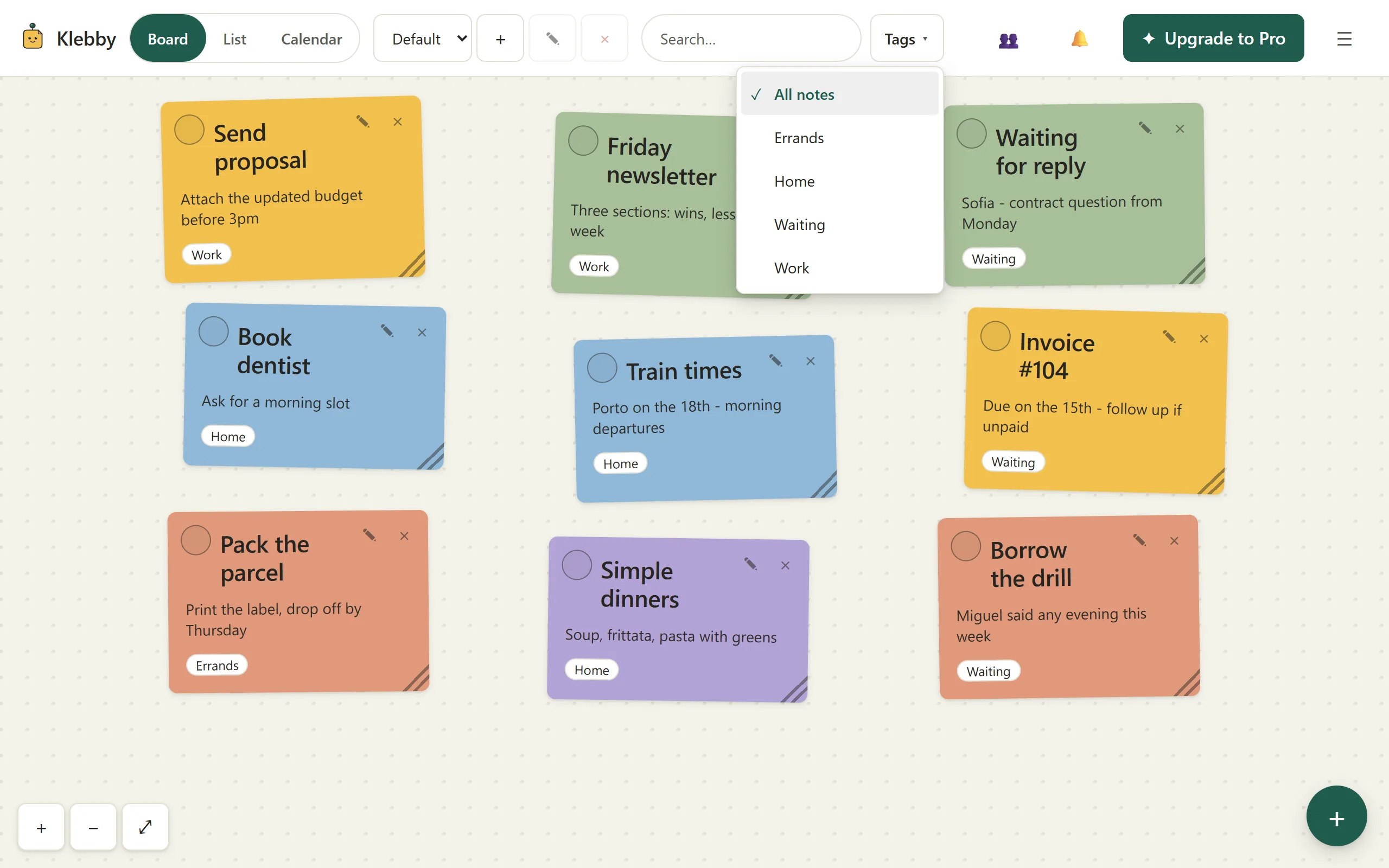
A digital board can become clutter just as quickly
Moving sticky notes from a wall to a screen removes lost paper, but it does not automatically create order. A digital canvas can hold more notes than a desk, which means it can also hide more stale ideas, duplicated tasks, vague reminders, and colour systems that made sense for one afternoon.
The answer is not a more elaborate taxonomy. If you are learning how to organize sticky notes digitally, begin with a small amount of structure that answers questions: What can I act on now? What is coming next? What am I waiting for? Which context do I need to see next hour?
Klebby supports a freeform board, list and calendar views, tags, filters, and reminders. Those features help only when each has a clear job. The aim is a board you can understand quickly, not a system that looks impressive in a screenshot.
Start with one working set
Do not begin by importing every note you have ever written. Pick one bounded situation: this week’s work, an upcoming move, a course, a household project, or the preparations for an event. A small real set reveals whether the method helps without creating a migration project.
Capture only notes that belong to that situation. If an item does not affect the current set, leave it where it is for now. This boundary lowers the pressure to invent categories for an entire life.
Once the set is useful, you can add another context or bring in older notes selectively. A working board teaches you which tags and zones you actually need. A mass import encourages you to design around hypothetical retrieval problems.
You can open Klebby with a small set or review the board, tag, list, and calendar features first.
Give the board three visible zones
Three zones are enough for many mixed workloads: Now, Next, and Waiting. Keep Now deliberately small. It contains work you can realistically touch today, not everything that feels important. Next holds ready work that does not need attention yet. Waiting holds notes blocked by a person, date, delivery, or decision.
These zones can be loose areas rather than formal columns. Leave space between them and keep their meaning stable for a week. When a note changes state, move it. The movement is useful because it makes the change visible without adding another status field.
If your work needs a different distinction, rename the areas. “Draft”, “Review”, and “Ready” may fit a creator. “This week”, “Later”, and “Reference” may fit personal planning. Use the fewest zones that help you decide.
Write titles you can scan
The quality of a board depends more on wording than colour. “Budget” is a topic. “Compare July electricity plans” is an action. “Marta” is a person. “Ask Marta for the final dimensions” says what must happen.
Put the recognisable next step in the title. Keep supporting detail in the body: a link, a measurement, a short reason, or the definition of done. If a note contains several actions that can move separately, split it. If the actions always travel together, a short checklist in one note may be clearer.
Avoid writing titles that require you to reopen every note. The board should support a quick scan. A precise title also makes list view and search more useful because the essential words are visible wherever the note appears.
Use tags for retrieval, not decoration
Position describes the current shape of work. Tags describe context that should survive movement. Useful tags often name a project, person, place, or recurring responsibility: “studio”, “home”, “Rui”, or “accounts”.
Start with three to five. Add a tag only when it answers a recurring question or creates a useful sharing boundary. A note does not need a tag merely to prove it has been organized. Untagged notes are fine when their position and title are sufficient.
In Klebby, filtering by one tag narrows the visible set. That makes a tag valuable when you need ten focused minutes on one client or want to see only household notes. Tags can also be shared, so choose names and contents that make the boundary understandable. The shared sticky notes guide explains that model in detail.
Let each view do one job
The board is best when space carries meaning. Use it to group, compare, and keep active work visually distinct. The list is better for density. Use it when you want to scan titles quickly, work on a small screen, or read similar items in a compact sequence.
The calendar is for notes with real dates. Do not assign deadlines simply to make ideas visible. A false date adds urgency without information. Use a date when something happens then, must be checked then, or becomes actionable then.
The views should not become separate systems. In Klebby they show the same notes. Change the view to match the question instead of copying content. The visual to-do list guide offers a fuller comparison between boards and lists.
Review instead of endlessly rearranging
Set a small review rhythm. A daily scan can take two minutes: clear completed notes, move anything whose state changed, and choose a realistic Now set. A weekly review can look for stale notes, tags no longer used, and waiting items that need a follow-up.
Do not rearrange the board every time work feels uncomfortable. Alignment can become a form of avoidance. Move a note when its meaning or state changes, not because the canvas could look neater.
Ask four questions: Can I act on this? Is the title clear? Does it still belong in this working set? Would a tag, date, or reminder genuinely help? If the answer to the last question is no, leave the note simple.
Control the amount of visible history
Completed notes are useful evidence, but an active board is not an archive. If finished work remains mixed with current work, the board gradually loses contrast. Mark notes done and let them leave the active area. Keep only recent completions if seeing progress helps.
Digital capacity is not a reason to keep everything on screen. The practical limit is the amount you can scan without searching. When the whole board looks like background texture, reduce the visible set before adding another classification layer.
Use reminders only for concrete returns
A reminder is helpful when a note needs to return at a specific moment: follow up on Friday, bring a document on Tuesday, or check a delivery after lunch. Attach the reminder to a clear note so the notification restores the context, not merely a date.
Do not use reminders for every task. Too many nudges train you to dismiss them. Position can express “soon”, a tag can express context, and the calendar can show genuinely dated work. Reserve notifications for moments when interruption is useful.
For recurring weekly planning, combine a small calendar set with a flexible board rather than assigning times to everything. The visual weekly planner for ADHD guide describes a low-friction approach without making medical claims.
Know when the board is the wrong container
A short ordered checklist is usually better as a list. A long document belongs in a document editor. Formal projects with dependencies, reporting, files, and complex ownership need software built for those demands. A sticky-note board should not absorb every kind of information simply because it can.
The board is a good fit when tasks and ideas benefit from separation, grouping, movement, and quick context switching. It is less useful when order is fixed or the material needs deep hierarchy.
Keep the test honest: after a week, are you finding the right note faster? Is the next action clearer? Are fewer tasks being copied between tools? If not, simplify or choose a different container. Current Klebby packaging is on the pricing page, but the organizing method does not require a paid plan to test.
Calm order is maintained, not designed once
A useful digital sticky-note system is not a perfect board built on day one. It is a modest structure that can survive ordinary change. One working set, a few zones, precise titles, restrained tags, appropriate views, and short reviews are enough.
When clutter returns, remove before adding. Clear stale notes, shrink Now, and retire tags that no longer answer a real question. The goal is not to preserve the system. The goal is to keep the work understandable.
FAQ
What is the simplest way to organize digital sticky notes?
Start with three visible areas such as Now, Next, and Waiting. Use clear note titles and add only a few tags for contexts you regularly need to filter.
Should every sticky note have a tag?
No. Add a tag when it helps you find, filter, or share a note. Untagged notes are fine when their place and wording already provide enough context.
How often should I reorganize a sticky-note board?
A short daily scan and a weekly reset are usually enough. Move or archive what has changed, but avoid polishing the layout whenever you feel uncertain.
When is list view better than a board?
Use a list for dense scanning, fixed sequences, or a small screen. Use the board when grouping, relative importance, or spatial memory helps.