A week needs shape without becoming a contract
A weekly plan can reduce uncertainty, but it can also become another source of pressure. A tightly scheduled grid asks you to predict energy, interruptions, and task duration several days in advance. When Tuesday changes, the whole plan can look broken even though the week is still workable.
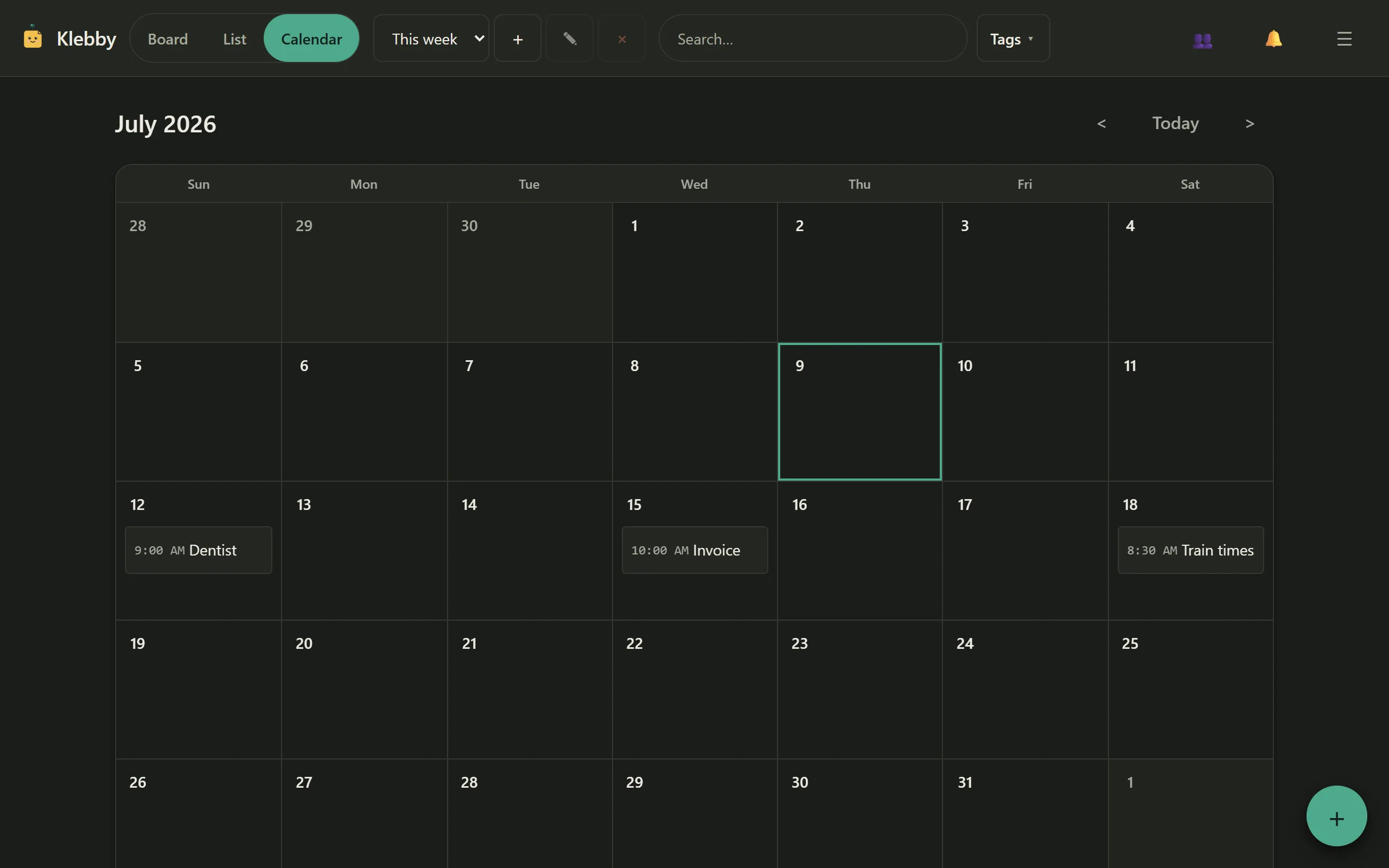
A low-friction visual weekly planner for ADHD uses two kinds of information: fixed points and flexible work. Appointments, real deadlines, and events belong on dates. Tasks, ideas, and optional work stay as movable notes on a board. The week gains a visible shape without pretending every hour is known.
This is a general organization method, not medical guidance. Klebby does not diagnose ADHD, provide treatment, or replace professional support. The modest claim is that separating fixed commitments from flexible notes may reduce planning decisions for people who prefer visual, spatial tools.
Begin with the fixed points
Open the calendar and add only events that genuinely happen at a time or on a date: an appointment, class, deadline, journey, call, or delivery. These are the edges around which the rest of the week can move.
Avoid filling the calendar with aspirational tasks. “Write proposal on Wednesday at 9” looks precise, but if Wednesday morning changes, the task becomes an apparent failure. Keep it on the board unless the time itself matters.
Once the fixed points are visible, notice the available spaces rather than packing them immediately. A day with two appointments may have less usable attention than an empty grid suggests. Travel, preparation, recovery, and transitions take real time even if they are not separate calendar events.
Klebby’s calendar and reminder features keep dated notes connected to the same note set used on the board.
Choose three outcomes for the week
Instead of ranking every task, choose a small number of outcomes that would make the week meaningfully better. Three is a useful starting point, not a rule. An outcome might be “send the final proposal”, “prepare the kitchen for the repair”, or “complete two course exercises”.
Write each outcome as a clear note and place it in a visible weekly area on the board. These notes are anchors, not the only work you may do. Routine errands and smaller tasks can sit nearby without competing for the same status.
If three is too many during a difficult week, choose one. If your work is highly predictable, choose more. Capacity is not a moral measure, and a planning method should make limited capacity easier to see rather than hide it under a longer list.
Build a small landing area for each day
Create loose areas for Monday through Friday, plus a “later” or “weekend” area if useful. Do not turn them into rigid columns with equal quotas. Their purpose is to give flexible tasks a temporary landing place.
Place only a few notes in each day. Leave room for the week to change. A note can move from Tuesday to Thursday without being rewritten, and an unfinished task can return to the weekly area rather than roll forward automatically forever.
Some people prefer areas named “early week”, “midweek”, and “late week”. That can reduce daily rescheduling while preserving sequence. Choose the smallest time structure that helps you start. The board is personal, so the spatial layout can match how you recognise the week.
Separate starting cues from full projects
Large tasks create friction because the note does not say where to begin. “Tax return” or “portfolio” asks the brain to plan before it can act. Rewrite the weekly note as the next visible step: “Download June statements” or “Choose three portfolio pieces”.
Keep deeper context in the note body. If a project has several independent steps, make separate notes only for the steps that are relevant this week. The planner should show the current edge of the work, not reproduce the entire project archive.
A good starting cue is small enough to begin and meaningful enough to recognise. It need not be trivial. “Draft the proposal opening” is clearer than “work on proposal” because it defines an entry point without predicting the whole session.
Use tags to reduce context switching
Tags can group the week by context: “home”, “calls”, “campus”, “client A”, or “low energy”. Filter to one tag when you are in that place or mode, then clear the filter to see the whole week again.
Keep the tag set restrained. If every note carries five labels, choosing them becomes part of the task. Add a tag when it supports a repeated decision: what can I do here, what belongs to this person, or what can I share?
Tag-level sharing can open one part of the week to another person without exposing private notes. A household tag might contain shopping and repair notes while personal appointments remain outside it. The shared sticky notes guide explains viewers, editors, and private boundaries.
Plan a minimum version of difficult days
Some days have little spare attention. Define a minimum version before the day arrives: attend the appointment, answer one essential message, and prepare tomorrow’s first note. Everything else remains movable.
This is not lowering every ambition. It is preventing an overloaded plan from hiding the true baseline. When energy or circumstances are better, you can pull another note from the weekly area. When they are not, the minimum still gives the day a clear shape.
Avoid using colour as a judgment. A difficult day does not need a red wall of overdue notes. Use colour only if it carries a stable, useful meaning. Clear wording and limited visible work are usually stronger signals.
Review twice, not continuously
A morning check can confirm fixed points and select the first note. An evening check can clear completed work and move what changed. Five minutes are more useful than rebuilding the plan whenever a task takes longer than expected.
At midweek, look at the three outcomes. Are they still relevant? Is one blocked? Does the remaining capacity support all three? Adjust openly. Moving a note is not evidence that the plan failed; it is the mechanism that keeps the plan connected to reality.
At the end of the week, notice what repeatedly moved. The task may be too vague, too large, no longer important, or dependent on something missing. Rewrite, split, remove, or place it in Waiting rather than carrying the same guilt-shaped note into another Monday.
Keep capture available on mobile
Plans often change away from a desk. A mobile view lets you capture a new note, check the day, or move an item without relying on memory until later. Keep mobile actions brief. Capture the thought with a clear title, add a tag or date only if obvious, and refine it during the next review.
The phone does not need to show the entire week like a desktop board. Use the list for a dense scan, the calendar for fixed dates, and the board for spatial context.
Know what this method cannot do
A visual planner cannot resolve chronic overload, create time that does not exist, or provide clinical support. If commitments consistently exceed capacity, rearranging notes will not fix the underlying demand. Remove, renegotiate, delegate, or seek appropriate support where possible.
Formal teams may need dependencies, workload reporting, files, and approval workflows. Klebby is intentionally lighter. It suits personal planning and small shared contexts, not complex programme management.
The method also may not suit everyone with ADHD. Some people prefer a linear list, paper planner, calendar-first system, or specialist tool. Use the format that reduces friction for you. The related ADHD sticky note app guide describes Klebby’s scope and non-medical position, while the digital sticky-note organization guide covers board maintenance.
Let the week stay movable
The setup is small: fixed points on the calendar, a few outcomes on the board, loose day areas, clear starting cues, restrained tags, and two reviews. It gives the week enough structure to be visible while leaving room for real life.
Try it with one week rather than redesigning your whole system. At the end, ask whether you started more easily, found commitments faster, and spent less time rebuilding the plan. If the answer is no, simplify it further or choose another method. If it helped, keep only the parts that earned their place.
You can open Klebby to test the method and check current Free and Pro options on the pricing page.
FAQ
Is this weekly planning method medical advice?
No. It is a general organization method and Klebby is not a health app. Professional support is the right place for medical advice, diagnosis, or treatment.
How many priorities should a visual week contain?
Keep the active set small enough to scan. Three meaningful outcomes plus fixed appointments is a practical starting point, but adjust it to your capacity.
What happens when the plan changes?
Move flexible notes rather than treating the original plan as a failure. Keep appointments and true deadlines fixed; let the rest adapt to the week you actually have.
Should every task go on the calendar?
No. Put genuinely dated commitments on the calendar. Keep flexible tasks on the board so they remain visible without creating false deadlines.